Storing business keys in Data Vault hubs looks simple, until different source systems use different keys for the same real-world entity. This article walks through why that happens, the workarounds that disappoint, and two practical patterns: load all keys into one hub, or split into multiple hubs linked in the Business Vault.
Using the business keys and storing them in the hubs seems the right and easy approach, but the reality is a bit more complex. You can encounter various issues. In this article, I would like to discuss one of those issues: “Different areas of business or source systems use different business keys for the same entity”.
Where different business keys come from
Let’s imagine a situation in which you are adding a new hub to your Raw Vault model and you plan to integrate data from at least two source systems. You took it seriously and you thoroughly read all the help topics about data entry and about searching various entities in the source system. You also analyzed data from the source system and interviewed the business. You finally found a good business key. Good job! You did the same for another part of your business and you also ended up with a good business key. Unfortunately, though, it differs from the first one :-( There are many examples of such scenarios:
- One system uses the plate numbers of cars. Another uses their VINs. A third uses both these identifiers. There can even be a “car id to be” used in the manufacturing plant before the VIN is assigned.
- Regions are identified by names (North, East, South, West) in one system and by letters in another system (N, E, S, W)
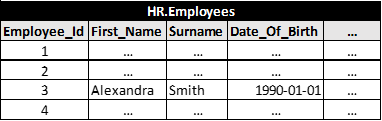
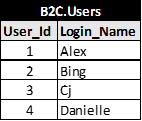
- HR system contains full employee identification and the sales system contains just login names (Alex, Bing, Cj, Danielle, …). Everybody knows that Alex is Alexandra Smith but it is not recorded in the sales system :-( Please note: If the granularity of the tables is different (e.g., there can be multiple user records per employee), these are different entities and will end up in different hubs.
- Two source systems are used for selling the same products due to a company merger/acquisition. A combination of the year + sequence number is used in one source system and a combination of an alphanumeric code for branch identification and a sequence number is used in another source system for orders. Fortunately, the orders from each source system are unique, which is not such a bad scenario. The worst case could occur for some other entities (e.g., customer). The very same real-world instance of the entity could exist in both systems, with different business keys.
Approaches that often fall short
How to deal with this? You can choose just one business key and try some of these solutions:
- Ask your friend in the IT department to add a new column to their table and populate it with the business key values of your choice. What about new records? Disclaimer: do not try this in your company;-)
- Create a manually maintained table(s) with the mapping(s) in your staging area and use it for look-ups while populating the Raw Vault core. What will happen when a new record appears from the source system and there is no mapping in your table? No problem: the loading process will fail, we will add a new mapping record and re-run the process. Job done! And what mapping record will you insert when the other business does not know their business key yet? I do not know…
- Submit a change request to add a new mandatory field to the source systems for entering the business key of your choice. You can wait several months and the result could be that it is not possible because the value of the business key of your choice is not known at the time when a record is created in another source system.
- Start a new project to build a master data management system generating business keys and propagating them to all source systems. This is a good approach. But can you wait several years?
Options and recommendations
There is no ideal solution because the business and operational systems used by it are not ideal. What are the options and recommendations:
- Load all business keys to one hub regardless of their specific format
- Add multiple hubs to your model
Key considerations
Consider the following options:
- It is not recommended to use one BK value within one hub to identify different real-world instances of an entity (i.e., BK “123” identifies Jane in one source system and BK “123” identifies Marc in a different source system).
- Are there any potential overlaps of non-corresponding business key values from different source systems (see example with “123” above)? If yes, you can still take the first way and either extend the hub business key with another column (source system) or add a prefix or suffix based on the source system to your business key values.
- Alternatively, it is not necessary to use the source system to distinguish between the different business keys. Using a domain identifier (e.g., “VIN” vs. “plate number”) is good enough. The benefit of using BK domains is that data from the source systems using the same BK domain are automatically integrated in the Raw Vault layer. You will end up with less records (if you go the first way) or less hubs (if you go the second way).
- Are all business keys single-column varchars? If not, you can still take the first way, but apply data type conversions, a concatenation of multiple BK columns into a single-column varchar or add additional columns with data types used in the source systems.
- Please note: using single-column varchar for storing your business keys reduces the likelihood that you will re-factor the hub in the future, but it could decrease the performance of the look-ups (check if a new BK value is detected in the source data). Using columns with the same data types as in the source system could speed up look-ups.
- Consider how the platform of your choice performs in different scenarios (varchars, multiple columns with different datatypes, … — consider row storage, number of I/Os, …).
- Does it make sense to implement it differently for hundreds of small tables and a few large tables, which consume 90% of your processing time? Will you find a unified way, which makes it easier to understand the model without sacrificing the performance?
- If you take the first way and you have mapping from the source or algorithm to pair the records, implement the same-as-link in the Business Vault layer. If you take the second way and have the mapping or the algorithm, implement a link to connect multiple hubs. Regardless of which way you choose, it could make sense to build a consolidated hub in the Business Vault layer.
- Multiple hubs connected with links mean more objects in the Raw Vault layer. The model could be more difficult to navigate. Follow a good naming convention and document it well to avoid confusion.
Thanks for reading. You can expect more information in the next article.
Frequently asked questions
Why do the same entities end up with different business keys?
Different source systems and business areas identify the same real-world entity differently, for example cars by VIN in one system and by plate number in another, or employees by full ID versus login name. Mergers make it worse when both systems hold the same customer under different keys.
Should I force one business key across all systems?
Usually it is not worth it. Editing source tables, maintaining manual mapping tables, submitting change requests, or building a full MDM system all carry cost, delay, or fragility. There is no ideal fix because the operational systems themselves are not ideal.
One hub or multiple hubs for the same entity?
Both are valid. Load all keys into one hub (optionally extended with a source or domain column to avoid overlaps), or use multiple hubs connected by links. One hub means more records; multiple hubs mean more objects to navigate, so weigh performance and clarity.
How do I avoid collisions when keys overlap between systems?
Do not let one key value map to different entities. Add the source system or a business-key domain (such as 'VIN' vs 'plate number') as part of the key. Using domains also auto-integrates systems that share the same domain.