
UD4D AI Accelerator for WhereScape
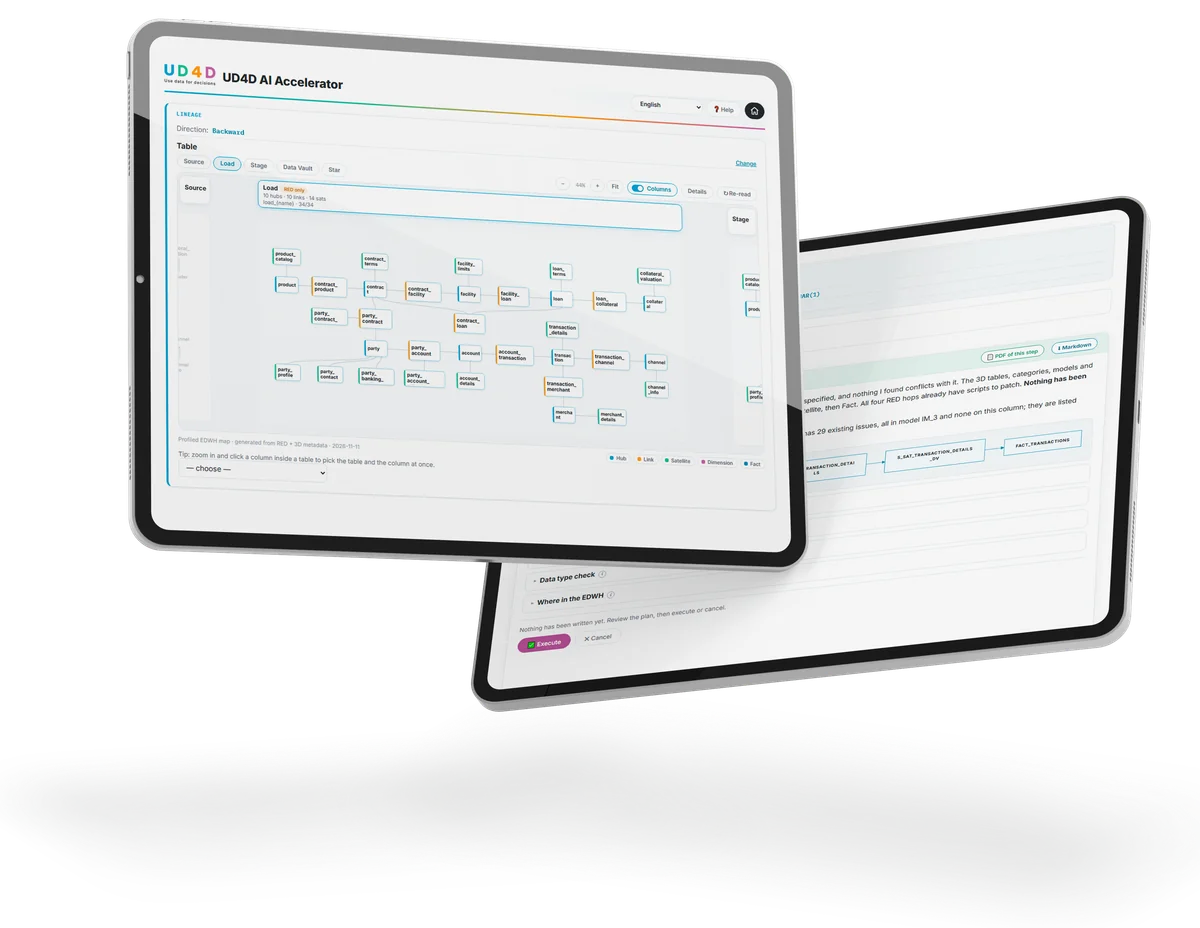
Change your WhereScape environment faster, without losing sight of what each change affects. The AI Accelerator is independent UD4D software that runs alongside that environment. It traces column-level lineage in seconds, analyzes impact before anything is modified, and automates repetitive WhereScape RED and 3D work, with human approval before any write is executed.
When the AI Accelerator is right for you
WhereScape already automates the core of the data warehouse. The AI Accelerator takes automation further into analysis and repetitive tasks that are still handled manually.
-
Tracing one column by hand
Understanding how a source column moves through Stage, Data Vault and star schema means following it manually, layer by layer.

-
Assessing change impact
Before an object changes, teams need to know what else it affects. Today that means tracing dependencies by hand.
-
Propagating changes
A single source change requires repetitive updates across multiple warehouse layers.

-
Concentrating knowledge in a few people
When repository knowledge sits with a small number of specialists, onboarding and day-to-day analysis become harder to scale.

Understand, change and govern your WhereScape repository
The UD4D AI Accelerator works directly with your metadata in the WhereScape RED and 3D repositories. It starts by reading your environment and ends with a change that a person has approved.
Environment & deployment awareness
The UD4D AI Accelerator first profiles the target environment before anything else runs, then adjusts what it can safely offer.
- Profiles the WhereScape RED/3D environment before other tools run
- Detects whether Data Vault and WhereScape 3D are in use
- Checks WhereScape RED/3D naming conventions and deployment characteristics
- Uses the environment profile to guide which capabilities can be applied safely

Lineage & impact analysis
The UD4D AI Accelerator traces where data comes from, where it goes, and what a proposed change could affect before anything is modified.
- Traces column- and table-level lineage inside WhereScape RED and 3D
- Cross-checks WhereScape RED and 3D lineage against each other
- Follows sources, transformations and targets across the warehouse
- Analyzes downstream impact before a change is made
- Follows fan-out through formulas, transformations and aggregations
Agentic column propagation
The UD4D AI Accelerator turns a source-column change into a controlled, reviewable update across the WhereScape pipeline.
- Propagates a new source attribute through WhereScape 3D and RED
- Carries the change through to the target database
- Prepares the proposed change as a package for review before execution
- Supports preview and dry-run before a live write
- Executes only after the package is approved
Data quality & repository health
The UD4D AI Accelerator identifies metadata problems across WhereScape RED and 3D and supports safe remediation before they become larger issues.
- Scans WhereScape RED and 3D repositories for invalid data-type modifiers
- Detects orphaned repository metadata
- Surfaces metadata inconsistencies across WhereScape RED and 3D
- Supports controlled cleanup where remediation is available
- Uses backup and transactional safeguards for write operations
A standards-conformant MCP server
The UD4D AI Accelerator implements the Model Context Protocol as a standard, so the tool layer stays independent of any single AI client.
- Exposes the UD4D AI Accelerator's tools through the Model Context Protocol
- Allows any compatible AI client to connect to the same underlying capabilities
- Keeps the tool layer independent of a single AI client or interface
- Supports natural-language interaction with repository exploration, lineage, analysis and actions
- Provides a reusable foundation for additional AI-assisted workflows
Governance & control
The UD4D AI Accelerator operates under human authority, with a defined boundary around what it can see and change.
- Executes no write until a human approves the prepared change package
- Works with metadata and transformation SQL only, never your business data
- Operates through controlled interfaces, without modifying WhereScape RED or 3D themselves
- Logs every action and re-verifies the result after execution
- Runs on-premises with your own AI provider of choice
How the UD4D AI Accelerator works

Environment profiling
Checks readiness before anything else runs.

Metadata ingestion
Reads the metadata from the repository.
Lineage engine
Maps sources, transformations and targets.

Reasoning / agent layer
Plans the required actions through the MCP.

Action layer
Prepares the change package for approval.

Governance & approval
Human sign-off and actions logged.
Feedback from step “Governance & approval” back to step “Action layer”: approved → executes / rejected → sent back
What this changes for your team
Teams answer impact questions faster, spend less time on repetitive repository work, and depend less on a handful of specialists.
- 85%
less time to trace column- and table-level lineage and dependencies
- 75%
less time needed to automatically propagate a new source column
- 20–50%
of annual WhereScape RED and 3D-related work significantly accelerated*
- 10–20%
of developer workload directly addressed by lineage and impact analysis*
*Directional estimates based on current user feedback.
How we deliver to your WhereScape environment
-
AI solution
Independent UD4D software that runs alongside your WhereScape environment.

-
Environmental fit
Configured to your repository structure, conventions and architecture.

-
Guided onboarding
Delivered with a dedicated consultant for setup, onboarding and team enablement.

Your questions about the AI Accelerator, answered
Wondering about WhereScape compatibility, deployment options, AI costs or data security? We've put together answers to the most common questions about using the AI Accelerator in your environment.
Do we need WhereScape 3D, or can the AI Accelerator start from WhereScape RED metadata?
Either works. The AI Accelerator can read the WhereScape RED repository, the WhereScape 3D repository, or both, so you can start with what you already use.
We run WhereScape on a different tech stack, such as Oracle, Teradata or Snowflake. How long does it take to adapt the AI Accelerator?
Not long. Lineage and documentation work on any platform WhereScape supports, with little or no adaptation, because the AI Accelerator reads WhereScape's own metadata, which looks the same whichever database sits underneath.
Applying changes needs a connector for your database: for a platform we haven't connected yet, that is a short, one-off piece of work we do as part of getting started.
What does it cost to run, in terms of AI usage, especially on a large warehouse?
Most of the AI cost comes from profiling your warehouse. After the first profile, the AI Accelerator re-profiles only what has changed, and lineage questions touch only the tables involved, so ongoing costs follow the size of your changes, not the size of your warehouse.
We recommend a full re-profile about once a week to keep up with your development.
You also choose the language model, so you can match it to the complexity of your warehouse. For a typical warehouse, we expect a full re-profile to cost in the order of a few dollars. Once we know the technical details of your setup, we can give you a more precise estimate.
WhereScape is adding its own AI and MCP capabilities, for example in WhereScape RED 11. How does the AI Accelerator relate to them?
The two complement each other. Everything the AI Accelerator produces, from lineage to column documentation, stays in your WhereScape metadata and is reviewed by your own experts. You can use this metadata freely outside the AI Accelerator too, so the work is never lost. It gives you a solid foundation for any future AI, including WhereScape's own, and we will gladly build on whatever WhereScape adds.
Can we use our own private LLM, so our metadata and SQL logic never leave our tenant?
Yes. The AI Accelerator talks to the language model through a configurable endpoint, so it can use a model hosted in your own tenant. By default it uses the OpenAI-compatible API, the most common standard for connecting language models. Connecting a new endpoint is a one-off setup step.
What does the AI Accelerator access in our environment?
It works with WhereScape metadata through a read-only database user and runs in your development environment.
Only column propagation, which applies changes, needs write access, and you decide whether to switch it on.
Your engineers review every proposed change before anything is applied.
We have more questions or concerns. Who can we talk to?
Write to us at info@ud4d.com and the people who built the AI Accelerator will get back to you. Whether it's a technical detail, a worry about fit, or a specific case from your own warehouse, we're happy to talk it through, with no obligation.
See the UD4D AI Accelerator run on a repository like yours
In a live demo, we trace lineage and propagate a change in a real WhereScape environment, then walk through what it means for your team.
Thanks — your message is on its way.
A member of our team will be in touch shortly. Meanwhile, feel free to keep exploring the site.